Micro:Bit — button

There are two buttons on the front of your §micro:bit

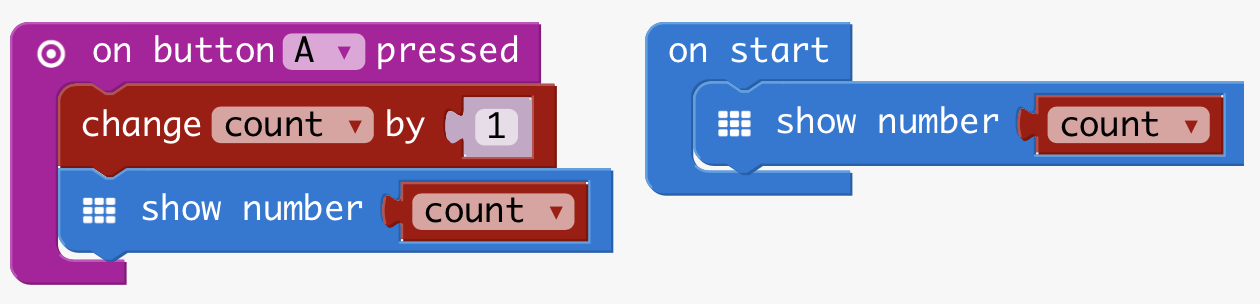
on button pressed

Blocks you drop into the on start container run once, when you turn your micro:bit on. Blocks dropped in forever keep running… well, until the batteries last.

on button pressed allows you to add blocks that will run when – and only when – one of the micro:bit’s buttons is pressed. Try the example above.

More useful things with buttons

Let’s make a light switch – what could be more useful?

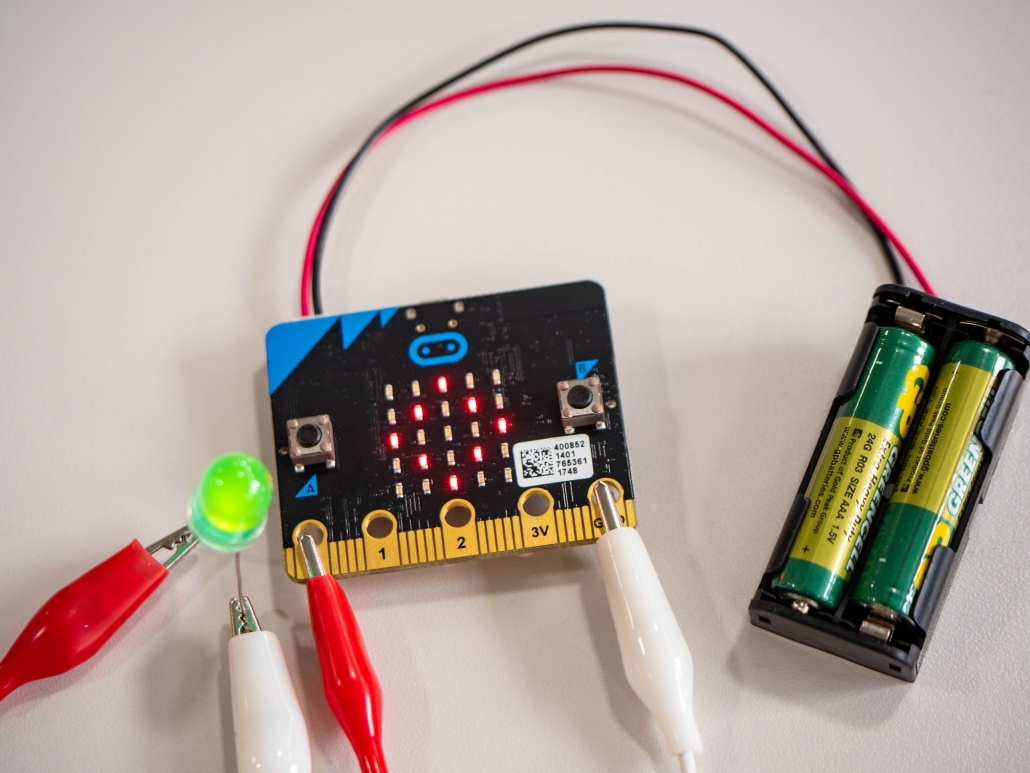
Try combining an on button pressed container with digital write pin to turn an LED on. The example on the led page will help you.
Challenges

  • How are you going to turn your light off? (hint: you have another button)
  • Can you think of any other ways to do it? (hint: your microbit can tell whether the pin is on or off. Can you work out how… and then what would you do with that information? This is tricky!)
  • How else could you turn your LED on or off?
  • You have red, amber and green LEDs. So you could make a traffic light sequence, which activated when you pressed a button. Just saying.

Links

Good to know

  • Your micro:bit has two buttons, A and B. You can also set an event block to trigger when both buttons are pressed at the same time.
  • You can connect buttons using the pin connections, with the on pin pressed event handler block. See that link for how to use yourself as the switch… or you could try making a switch out of bits of foil.

© Northumbria University 2014-26